Shell Making Options
Shell Making provides the following setup options:
Number of Primary Dip Cycles
By default, the number of primary dip cycles is specified by the cost model variable defaultNumPrimaryDipCycles (3 in starting point Digital Factories). With this setup option, users can override the default on a per-part basis.
The process routing includes one occurrence of Primary Sand Coating and one occurrence of Primary Slurry Dipping for each primary dip cycle. See Primary Sand Coating Feasibility, Primary Slurry Dipping Feasibility, Primary Sand Coating Formulas, and Primary Slurry Dipping Formulas.
Number of Backup Dip Cycles
By default, the number of backup dip cycles is specified by one of the following the cost model variables (depending on part weight):
-
numBackupDipCycles_min (3 in starting point Digital Factories), for parts with mass no greater than the cost model variable partWeightThreshold_small (13.608kg in starting point Digital Factories).
-
numBackupDipCycles_low (6 in starting point Digital Factories), for parts with mass greater than the cost model variable partWeightThreshold_small (13.608kg in starting point Digital Factories) and no greater than the cost model variable partWeightThreshold_large (45.359 in starting point Digital Factories).
-
numBackupDipCycles_high (9 in starting point Digital Factories), for parts with mass greater than the cost model variable partWeightThreshold_large (45.359 in starting point Digital Factories).
With this setup option, users can override the default on a per-part basis.
The process routing includes one occurrence of Secondary Sand Coating and one occurrence of Secondary Slurry Dipping for each backup dip cycle. See Secondary Sand Coating Feasibility, Secondary Slurry Dipping Feasibility, Secondary Sand Coating Formulas, and Secondary Slurry Dipping Formulas.
Include Slurry and Sand Costs
By default in starting point Digital Factories, the cost for slurry and sand is included as Expendable Tooling Cost per Part for the following processes:
Administrators can customize the default with the cost model variable defaultIncludeSlurryAndSandCosts (set to true in starting point Digital Factories).
Users can override the default on a per-part basis with the setup option Included Slurry and Sand Costs, provided by the Shell Making node in the Process Options Editor.
Primary Slurry Selection
The primary slurry selection is the slurry composition used for the Primary Slurry Dipping process. It drives Expendable Tooling Cost per Part.
By default in starting point Digital Factories, the cost model assumes the use of the slurry composition listed as Ferrous Option1 in the lookup table slurryConstituents.
Administrators can customize the default by setting the cost model variable defaultPrimarySlurry to one of the values in the Name column of slurryConstituents.
Users can override the default with the setup option Primary Slurry Selection, provided by the Shell Making node in the Process Options Editor. The available options are taken from the Name column of those rows of slurryConstituents that have Primary in the Application Column.
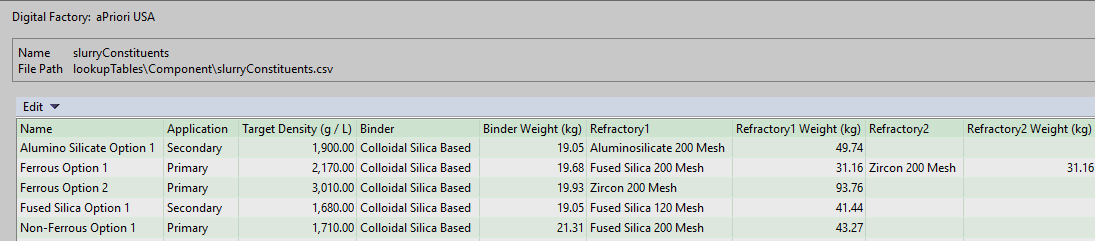
Note: If you want to add a new slurry composition type, you must update both this lookup table and the toolshop for Primary Slurry Dipping. You must add a line to slurryConstituents that specifies information about the composition's binder and refractory materials. In addition, you must update the toolshop variables with binder information (if the composition introduces a new binder). And you must update the Tool Materials table with refractory information (if the composition introduces a new refractory material). See Expendable Tooling Cost per Part for details on how the cost model uses the lookup table and toolshop.
In the lookup table slurryConstituents, Binder Weight, Refractory 1 Weight, and Refractory 2 Weight specify the mass of the constituent required make 10 gallons of slurry.
Secondary Slurry Selection
The secondary slurry selection is the slurry composition used for the Secondary Slurry Dipping process. It drives Expendable Tooling per Part.
By default in starting point Digital Factories, the cost model assumes the use of the slurry composition listed as Fused Silica Option 1 in the lookup table slurryConstituents.
Administrators can customize the default by setting the cost model variable defaultSecondarySlurry to one of the values in the Name column of slurryConstituents.
Users can override the default with the setup option Secondary Slurry Selection, provided by the Shell Making node in the Process Options Editor. The available options are taken from the Name column of those rows of slurryConstituents that have Secondary in the Application Column.
Note: If you want to add a new slurry composition type, you must update both this lookup table and the toolshop for Secondary Slurry Dipping. You must add a line to slurryConstituents that specifies information about the composition's binder and refractory materials. In addition, you must update the toolshop variables with binder information (if the composition introduces a new binder). And you must update the Tool Materials table with refractory information (if the composition introduces a new refractory material). See Expendable Tooling per Part for details on how the cost model uses the lookup table and toolshop.
In the lookup table slurryConstituents, the columns Binder Weight, Refractory 1 Weight, and Refractory 2 Weight specify the mass of the constituent required make 10 gallons of slurry.
Primary Sand Selection
The primary sand selection is the sand type used for the Primary Sand Coating process. It drives Expendable Tooling Cost per Part.
By default in starting point Digital Factories, the cost model assumes the use of the sand type Fused Silica 120 Mesh.
Administrators can customize the default by setting the cost model variable defaultPrimarySand to one of the values in the Name column of the toolshop Tool Materials table for the Primary Sand Coating process.
Users can override the default with the setup option Primary Sand Selection, provided by the Shell Making node in the Process Options Editor. The available options are taken from the Name column of the toolshop Tool Materials table for Primary Sand Coating.

Note: If you add a new sand type, ensure that you capture the correct particle size, as sand costs are very sensitive to this value. See Expendable Tooling per Part for details on how the cost model uses the toolshop.
Secondary Sand Selection
The secondary sand selection is the sand type used for the Secondary Sand Coating process. It drives Expendable Tooling Cost per Part.
By default in starting point Digital Factories, the cost model assumes the use of the sand type Fused Silica 120 Mesh.
Administrators can customize the default by setting the cost model variable defaultSecondarySand to one of the values in the Name column of the toolshop Tool Materials table for the Primary Sand Coating process.
Users can override the default with the setup option Primary Sand Selection, provided by the Shell Making node in the Process Options Editor. The available options are taken from the Name column of the toolshop Tool Materials table for Primary Sand Coating.
Note: If you add a new sand type, ensure that you capture the correct particle size, as sand costs are very sensitive to this value. See Expendable Tooling per Part for details on how the cost model uses the toolshop.